
How to Avoid Overediting Dating Profile Photos
Your dating profile photo is often your first impression - it matters more than you think. Overediting can mislead potential matches and harm trust. Instead, focus on simple strategies to improve your photos while staying true to your appearance. Here's how:
- Start with quality photos: Use natural lighting, flattering angles, and clean backgrounds. Avoid harsh shadows or overexposed images.
- Keep edits subtle: Adjust brightness, contrast, and color lightly. Remove temporary blemishes but leave unique features like freckles untouched.
- Avoid heavy filters: Over-smoothing skin or over-saturating colors can make photos look fake. Natural texture and tones are key.
- Use tools wisely: AI tools can refine photos without overdoing it, ensuring they still look like you.
The goal? A polished yet honest photo that reflects your best self. Natural, high-quality images can increase matches by up to 5× and make you 10× more likely to get messages. Stick to these tips to create a profile that feels real and inviting.
Start with High-Quality Base Photos
A clear, well-lit, and properly framed photo is the foundation of a great image. When you start with quality, you'll need fewer adjustments later.
Use Natural Lighting and Flattering Angles
Soft, indirect light is your best friend for smooth skin tones and minimal shadows. Facing a large window provides even, diffused light, while overcast days naturally soften contrasts. Avoid harsh overhead lighting - like midday sun or indoor ceiling lights - as these can cast unflattering shadows under your eyes, nose, and chin. And skip your phone's flash; it tends to flatten features and highlight imperfections. OkCupid even noted that "the hard light of a flash often ages the appearance of its subject by accentuating wrinkles and blemishes" [8].
For the best results, take photos during the golden hour - shortly after sunrise or just before sunset. This time of day offers warm, soft light that’s incredibly flattering. If you're outside on a bright day, find shade under a tree or building to avoid squinting. Position your camera slightly above eye level and angle it downward for a more flattering perspective. As professional photographer German Marin suggests:
If you're looking straight at the camera with a genuine smile, natural and not super-pose-y, those photos will work really well [4].
Frame and Crop Carefully
Once you've nailed the lighting, focus on composition to make your photo naturally appealing. Framing is key to keeping the attention on you while minimizing the need for edits. Use your phone's grid setting to apply the Rule of Thirds - position your eyes along the top horizontal line for a balanced and engaging shot [7]. For a classic profile photo, your head and shoulders should fill about one-third of the frame [9].
Leave a little "breathing room" around the edges to avoid a cramped look. Choose clean, simple backgrounds like solid-colored walls, textured bricks, or natural outdoor settings to keep the focus on you. Standing a bit away from the background can create a soft blur, making you stand out even more.
Finally, always use your phone's back camera instead of the selfie camera. The back camera delivers up to three times better quality and higher resolution [3]. For an even sharper image, set up a tripod and use a timer to take photos from a few feet away - this helps avoid distortions and ensures a polished result.
Make Subtle and Minimal Edits
Dating Photo Editing Guide: Subtle vs Overedited Comparison
Once you’ve got a solid base photo, keep your edits simple. Focus on removing distractions - like fixing poor lighting - rather than changing your appearance. As Fix the Photo explains:
The image that looks artificial won't get you far as it isn't a real-life reflection. Make everything naturally edited [10].
Adjust Color and Brightness Moderately
Basic color correction can elevate a photo, but moderation is crucial. Start by fine-tuning brightness and contrast - brightness adjusts all pixels equally, while contrast enhances the difference between light and dark areas [10]. Adjust these together to maintain a natural look. Then, tweak shadows and highlights, as these are powerful tools for balancing light.
For color, tools like "Color Balance" or "Hue/Saturation" can help you refine tones without permanently altering the original image [10]. Avoid overdoing saturation - overly vivid colors can look unnatural [6]. Pay close attention to your eyes: overly bright or unnaturally vivid irises can create what photographer Christopher Todd calls a "Barbie or Ken doll effect" [6]. For more control, use "Levels" or "Curves" instead of simple sliders [10].
Limit Skin Retouching to Temporary Blemishes
When retouching skin, less is more. Focus on temporary blemishes like zits or redness, and leave permanent features like freckles or birthmarks untouched [5]. Tools like "clone stamping", "spot healing", or "AI removal" are ideal for targeting specific areas without applying a filter to your entire face [12][11]. This approach keeps your skin’s natural texture intact.
Avoid using "blur" tools or heavy "skin smoothing" sliders that erase pores and fine lines, as these can make your skin look overly polished and artificial [11][5]. Portrait photographer Allison Zulawski advises:
Naturalistic editing is good, but avoid airbrushing yourself to plastic perfection [5].
Rachel DeAlto, Chief Connection Officer at Match Group, adds:
Only use filters or retouch photos to eliminate a blemish, brighten a picture or change the background [6].
A good rule of thumb? If the edits are the first thing someone notices, you’ve gone too far [6].
Avoid Heavy Airbrushing and Filters
To keep your photo authentic, skip heavy filters and airbrushing. Overediting - like blurring skin, oversaturating colors, or creating unnaturally smooth textures - makes your photo look fake [6][5]. Christopher Todd emphasizes:
You don't want to tweak your eyes too much or make your skin so soft that you look like a Barbie doll. It should not be the first thing you notice in a photo [6].
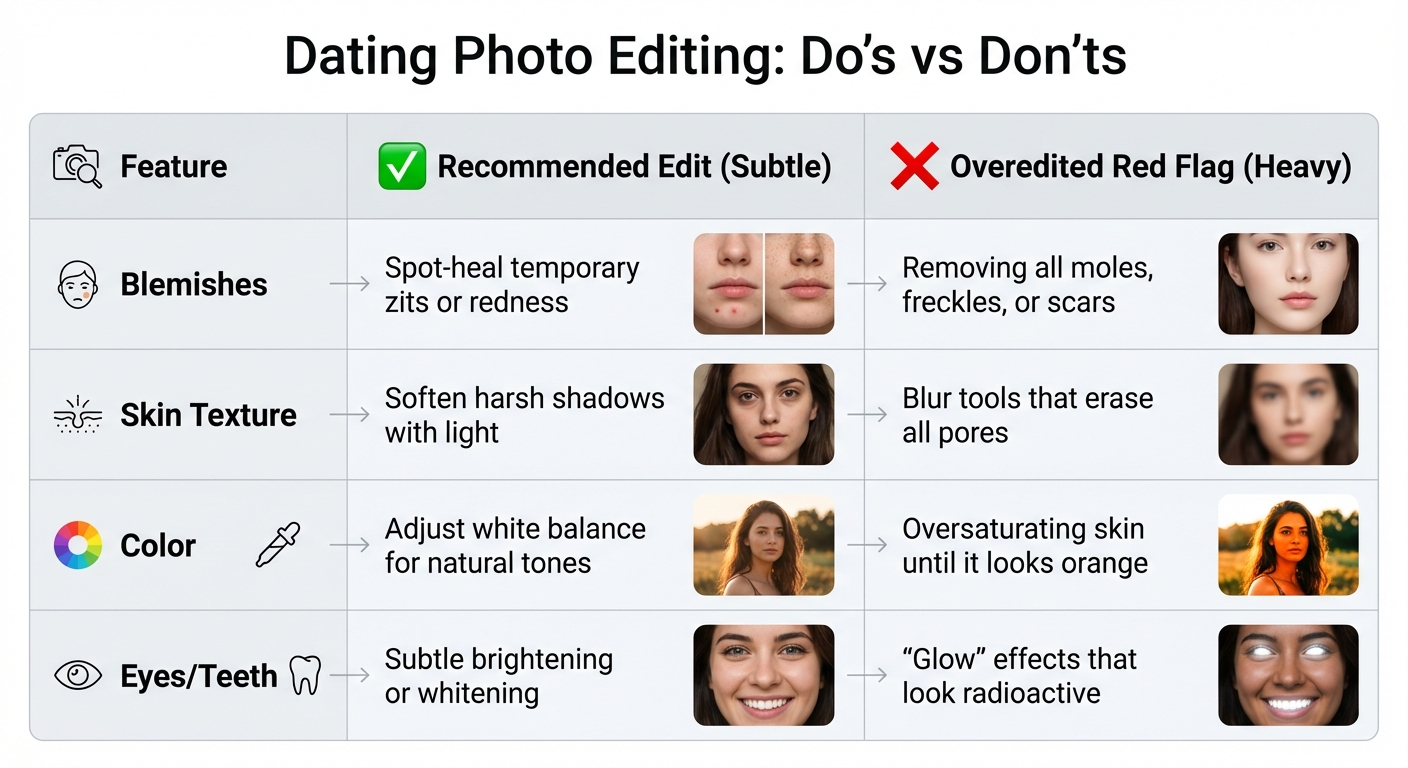
| Feature | Recommended Edit (Subtle) | Overedited Red Flag (Heavy) |
|---|---|---|
| Blemishes | Spot-heal temporary zits or redness | Removing all moles, freckles, or scars |
| Skin Texture | Soften harsh shadows with light | Blur tools that erase all pores |
| Color | Adjust white balance for natural tones | Oversaturating skin until it looks orange |
| Eyes/Teeth | Subtle brightening or whitening | "Glow" effects that look radioactive |
Recognize Common Signs of Overediting
Red Flags of Overediting
Overediting can sneak up on you, but there are clear signs to watch for. One of the biggest giveaways? Unnaturally smooth skin. If your pores are completely gone and your face looks more like plastic than human, it's time to dial it back [1]. Samantha Yoon, Senior Lifestyle Editor at Luxy, points out:
heavy editing can make you seem disingenuous and may deter potential matches from reaching out [1].
Another telltale sign is distorted facial features, which often happens in close-up selfies. These types of photos tend to exaggerate your features, making overediting even more noticeable [2][3]. Also, check your gallery - if you look like a different person in every photo, it could hurt your credibility [13].
Be mindful of harsh lighting artifacts, like "raccoon eyes" caused by camera flash, which can indicate excessive editing [13]. Austin James Jackson, a landscape photographer, puts it plainly:
If you have to ask yourself if you've committed one of these overediting mistakes, you probably have [14].
On the technical side, watch out for sharpening halos - those unnatural white or bluish outlines that appear around your hair or body. Another red flag is when shadows are nearly as bright as highlights, which defies how light naturally works [14]. These clues can help you spot when you've gone too far.
Quick Self-Check for Natural Photos
Before you upload a photo, take a moment to double-check it. Start by zooming in on high-contrast edges and your skin. If you notice halos or your pores have vanished, scale back the edits [14][1]. Then do a simple "eye test": ask yourself if the colors and lighting look like what you actually saw in real life [14].
Another tip is to ensure your smile looks genuine. A natural "Duchenne smile", where your eyes crinkle slightly, conveys warmth, while a stiff or overly posed expression can feel fake [1]. Lastly, make sure your gallery is consistent. Include 4–6 recent photos - mixing headshots, full-body shots, and candid moments - that all clearly represent the same person [1]. Eddie Hernandez, an online dating photographer, offers this perspective:
the best photos for dating apps are not about getting perfectly lit, posed portraits... they have quite a bit to do with activities, expressions, candidness, lifestyle, being comfortable in your own skin and being approachable [13].
sbb-itb-06ba92c
Use AI Tools for Natural-Looking Enhancements
Benefits of Dating Photo AI
AI technology has stepped in to help you present your best self online without losing that all-important natural vibe. Dating Photo AI is an example of this, offering tools that enhance your photos while keeping them approachable and down-to-earth.
What makes this tool stand out? It's trained on successful profiles from apps like Tinder, Hinge, and Bumble, ensuring your photos look inviting instead of overly polished or staged [16]. The AI mimics the look of smartphone photos, complete with natural bokeh and candid angles. The result? Pictures that feel like they were taken by a friend on a good day - not in a sterile studio [15]. As Alexander Liebisch from TinderProfile.ai explains:
The goal isn't to become a different person. It's to get dating profile pictures that look like they were taken by a talented friend on a day you were feeling your absolute best [16].
The process is simple: upload 5–15 clear photos from different angles, and the AI works its magic by refining lighting and composition while keeping your natural features intact [16]. The results speak for themselves - users have reported up to a 300% boost in matches after updating their profiles with these AI-enhanced images [17]. Plus, profiles with high-quality photos are 10 times more likely to receive a first message [1].
Plans and Features
Dating Photo AI offers flexibility with three tailored plans: Starter (40 photos), Dater (80 photos), and Casanova (unlimited photos with custom prompts).
No matter which plan you choose, the focus remains on creating photos that feel authentic. The AI avoids the "uncanny valley" by keeping subtle imperfections intact and placing you in believable settings like cafes, parks, or city streets - steering clear of bland studio backdrops [15]. Even personal details like facial structure, scars, and tattoos are preserved, ensuring the photos still feel like you [15].
Conclusion
Your dating profile photo serves as your digital first impression[1]. The goal isn’t to create a version of yourself that’s unrecognizable with heavy filters or over-the-top edits. Instead, it’s about showcasing the best, most genuine version of you.
Start with high-quality photos taken in natural light - these often need only minor adjustments. A simple, heartfelt smile can increase your perceived attractiveness by 23%[17].
When it comes to editing, less is more. It’s fine to clean up temporary blemishes, but let your natural features shine. Overediting can strip away the authenticity that builds trust and connection[6].
This is where tools like Dating Photo AI come in. They refine your photos in a way that feels natural, saving you the hassle and expense of professional photo shoots. Some users have experienced up to a 300% boost in matches after updating their profiles with polished yet authentic images[17].
From capturing great lighting to making subtle edits, the key takeaway is clear: genuine photos foster trust and spark interest. Authenticity always wins. A high-quality photo that reflects the real you - on your best day - will resonate far more than an overly edited image that feels disconnected from reality. Stay true to yourself, keep it natural, and let your personality shine through.
FAQs
How do I know if my dating profile photo is overedited?
An overly edited dating profile photo can stand out for all the wrong reasons - think excessive filters, unnaturally smooth skin, or features that look dramatically altered, like reshaped faces or exaggerated eyes. These tweaks can make the image feel less genuine and even off-putting.
Instead, aim for photos that are polished yet still reflect the real you. Small adjustments, like improving lighting or removing tiny distractions, are perfectly fine. But the focus should always be on showcasing your natural features and personality. A little authenticity goes a long way in making a lasting impression!
Why is natural lighting important for dating profile photos?
Natural lighting plays a key role in creating dating profile photos that feel genuine and visually appealing. It offers a soft, flattering glow that reduces harsh shadows while highlighting your features naturally, helping you present yourself in the best possible light.
This type of lighting also brings out your true skin tone and captures authentic expressions, making your photos feel honest and relatable. By relying on natural light, you can avoid the need for heavy filters or excessive editing, ensuring your profile looks polished yet real. Bright, well-lit photos tend to be more inviting, helping you make a strong first impression and increasing your chances of connecting with potential matches.
How can AI tools improve dating profile photos while keeping them authentic?
AI tools can help elevate your dating profile photos by fine-tuning details, adjusting lighting, and enhancing features in a subtle way - without straying from your natural look. The result? Polished photos that still feel like you, making that all-important first impression both genuine and memorable.
These tools use cutting-edge technology to produce high-quality images that emphasize your best attributes in an authentic and credible way. It’s a smart way to stand out on dating apps without resorting to heavy-handed edits or filters.